Core Features
Pages
Share agent-created designs and reports with your team, and turn comments into updates
Superset Pages gives your agents a way to present designs, reports, and analysis to your team. Teammates comment directly on the page, and an agent picks up the feedback, makes changes, and publishes an updated version.
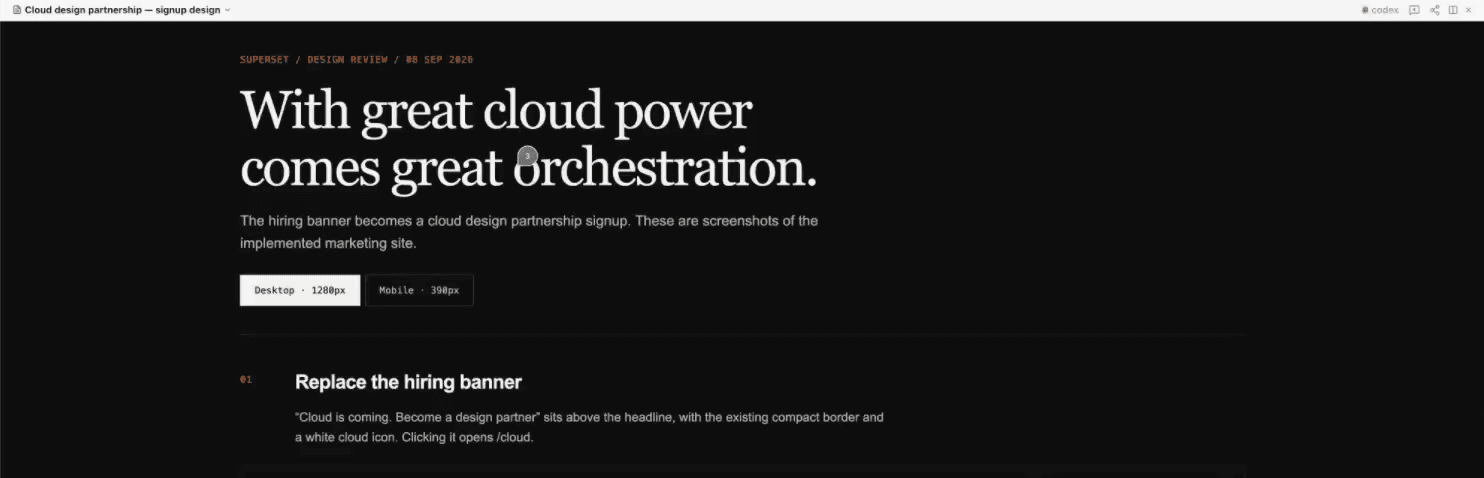
The Design Loop
- Create. Ask an agent to build a design doc, report, or proposal and publish it as a Page.
- Share. Send the page's link to your team.
- Comment. Teammates pin feedback to the part of the page they want to discuss.
- Iterate. The agent watching the page receives new comments, updates the source, republishes, and replies to the threads it addressed.
Create Your First Page
Open the Pages tab and click Create with AI. Superset starts an agent session that asks what you want to create, helps build the page, and publishes a link for your team. The help icon beside the Pages title opens this guide.
You can also ask an agent in an existing Superset workspace:
Create a design doc for our onboarding flow and publish it as a Superset Page
so the team can review it and leave comments.
Or start with work the agent has already done:
Turn your findings into a report and publish it as a Page for the team.The Superset plugin includes a Pages skill that guides agents through building, publishing, and updating pages. A page can be a self-contained HTML file or a directory with an index.html and supporting assets. When an agent finishes work that someone else will read, such as a PR walkthrough, a comparison, or a report, the agent offers to publish it as a page and waits for your answer.
To publish from the CLI, run:
superset pages publish design.html --title "Onboarding design" --label "First draft"The command returns a shareable URL. Publishing does not open the page or move the desktop to another workspace. See the CLI reference for options.
Find Workspace Pages
Open the Pages menu beside Run, above Files / Changes / Review. It lists pages published from the workspace, your pinned pages, and All pages. Choose New page, enter a request, and pick an agent to create it. A blue New indicator marks a fresh publish until you close the menu.
The main Pages list shows linked workspace names so you can see where a page came from. Clicking a page there does not switch workspaces.
Web links inside a workspace Page follow Settings → Browser → URL links, and links to other Pages follow Settings → Files & Editor → Page links. Both open outside the Page pane. If no plain-click action is set, a plain click opens a pane. Links in standalone Pages in the desktop app open in the system browser.
Share a Page
Use Share to choose who can open the page:
- Only you: a private draft.
- Anyone in your organization: members of your organization. This is the default for new pages.
- Anyone with the link: anyone can read it without signing in. Public access does not grant comment or edit permissions, or access to the rest of the version history.
When a page is public, the Share button shows a globe icon.
Shared version controls whether the link follows the latest publish or stays on a specific version. Anonymous readers can access only that shared version.
For a new page, the CLI accepts --visibility just_me, --visibility org, or --visibility everyone. Republishing preserves visibility unless you explicitly change it. Shared links include the page thumbnail in link previews, including Slack unfurls.
Anyone viewing a public page can use Report to flag it to the Superset team with a reason, optional details, and an optional email. The Superset team reviews reports and can take a page down, which stops its link working.
Send Feedback Directly to an Agent
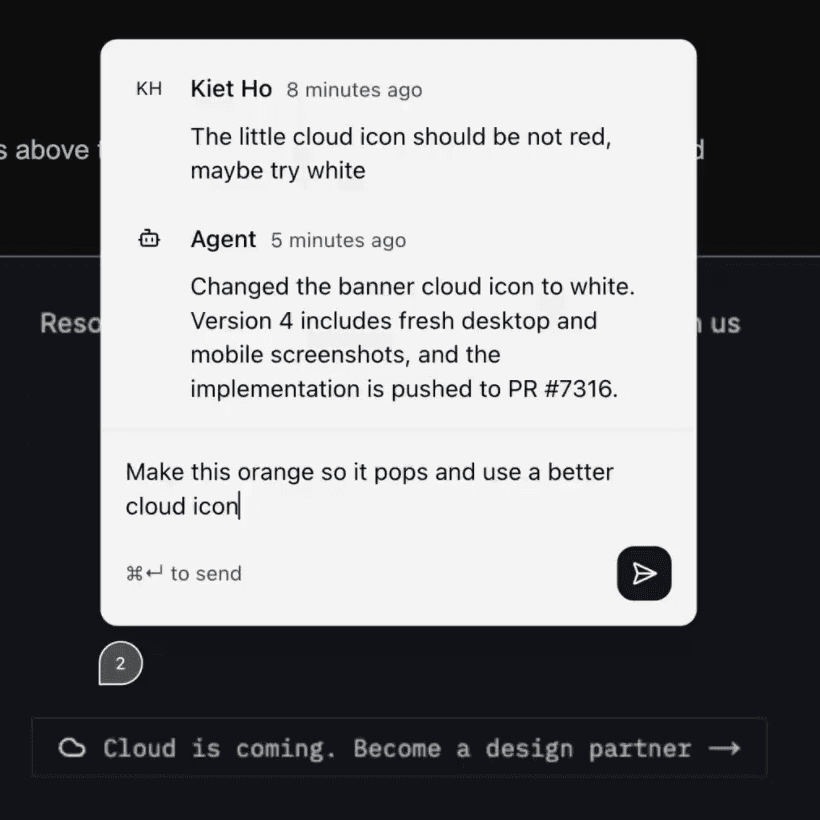
Open the page, enter comment mode, and click an element to pin feedback to it. The agent receives the comment along with context identifying the element, so teammates can point to exactly what they want changed.
On iPhone, the comments sheet keeps replies inline. Tap Reply to target a thread, or clear the reply target to leave a page-level comment. Resolved threads appear under the resolved-comments disclosure.
Publishing from an agent's Superset terminal attempts to register that session for new comments. Check the command's watch status; a failed registration does not fail the publish. In the workspace page pane, open the Listening agents menu in the page header:
- It lists every agent watching the page, including agents on other devices. Click a row to open that agent's terminal.
- The page's creator can click the X on a row to stop that agent watching.
- The page's creator can use Add listening agent to assign a running agent in the workspace, or start a new agent session and assign it.
Keep the host and agent session running for automatic feedback delivery. If the menu says No listening agents, the page's creator can add one. New comments are delivered when the agent is available to handle them.
The agent can change the page, answer a question in the thread, or leave feedback open when it needs more discussion. When it makes a change, it republishes the page, replies with what changed, and resolves the feedback it addressed.
Keep Iterating on the Same Page
Publish the same source path from the same workspace to create a new version of the existing page. Your team keeps using the same link, and earlier versions remain in version history.
superset pages publish design.html --label "Simplified onboarding after team review"If the source moved or you're publishing from another workspace, pass the existing page ID explicitly:
superset pages publish design.html --page <page-id> --label "Updated onboarding flow"Publishing from outside a workspace works too, but there's no path for a later publish to resolve against: every run creates a separate page unless you pass --page. The publish tells you when that happened and prints the command to reuse.
Use the page title menu to preview earlier versions read-only, rename the page, or refresh it. You can also inspect version history or retrieve a published version:
superset pages versions <page-id-or-slug>
superset pages pull <page-id-or-slug> --version 1 > original-design.html
Read What Viewers Stored
A page can keep values under each key with window.superset.storage. Each call takes an optional { scope }:
| Scope | What it holds |
|---|---|
slot (default) | One value per person. Everyone can read all of them. Good for votes and RSVPs. |
private | One value per person. Only that person can read it. Good for drafts and settings. |
shared | One value per key for the whole page. Any member of the page's organization can overwrite it. |
To find keys, list returns the keys in one scope that start with a prefix, sorted by key:
const keys = await window.superset.storage.list("pipeline:", { scope: "shared" });
// [{ key: "pipeline:1", records: 1, updatedAt: "2026-10-12T09:30:00.000Z" }]
A page can store up to 20 MiB in total. You can read what viewers stored:
superset pages storage <page-id-or-slug>
superset pages storage <page-id-or-slug> --key votes
The first command lists each key and how many people stored a value under it. With --key, it prints each person's value and when they last changed it. With --scope private, you see only your own value. Add --scope to pick slot, private or shared. Add --json for the raw records. On a just_me page only the creator can read storage. On an org or everyone page, members of the page's organization can read it, even when the page is public.
You can also write storage as yourself, for example to refresh data from an automation without a new publish. Both --set and --remove need --key, and --set takes a JSON value:
superset pages storage <page-id-or-slug> --key data --scope shared --set '{"deals": 42}'
superset pages storage <page-id-or-slug> --key data --scope shared --remove
Only signed-in members of the page's organization can write storage, and on a just_me page only the creator can. Anyone who can write can overwrite or remove a shared value. Someone outside the organization who opens an everyone page can read the page, but not its storage. Reading storage and writing it both need membership in the page's organization.
Show Live Data from Your Tools
A page can call a tool from a plugin, such as a read-only database query or a web search, and show the result. The call runs as the person viewing the page, through their own connected account. The page itself makes no network request; Superset makes the call.
const tools = window.superset?.tools;
if (await tools?.ready) {
  const result = await tools.call("neon", "run_sql", {
    sql: "select count(*) from organizations",
  });
}- Consent. The first time a page calls a plugin, the viewer sees a dialog and chooses whether to allow it. The choice applies to that page and that plugin, for every tool of the plugin, including tools that change data, and for future versions of the page. The viewer may also be asked to install the plugin, connect an account, or choose which account to use.
- Trust. A page can send what it reads to other websites, for example in an image URL. Only allow pages you trust.
- Their data. Each viewer sees results from their own account, so two people can see different numbers. A signed-out viewer cannot use tools.
- Databases and search. The
neonplugin runs SQL against the viewer's Neon database, writes included, so only run read queries from a page. Theexaplugin gives a page Exa's search tools. - Errors. A call fails with a code in
error.code:needs_install,needs_connection,denied,unavailable_signed_out,rate_limited,invalid,tool_errororunavailable. A tool that fails returnstool_errorwith the tool's message. A call times out after 60 seconds. Time the viewer spends in the dialog does not count. - Not on mobile. Tools work in the desktop app and on the web, not in the mobile app.
Removing a page's tool access from the app is not available yet.
Agents connecting through MCP can publish, retrieve versions, read a page's storage, and reply to or resolve comments with the Pages tools.